Telegram Bot Integration
This document outlines the integration of a Telegram bot designed to interact with blockchain functionalities, including minting NFTs, managing wallet sessions, and more.
Bot Commands
Prompt Command
Generates an image based on the provided prompt and initiates an NFT minting process.
User: /prompt <image description>
Bot: <Responds with generated image link>
Get Balance
Retrieves the user’s wallet balance.
User: /getbalance
Bot: Balance for wallet <wallet_id>: <balance>
Wallet Management
When a user sends the /wallet command, the bot initiates the wallet connection process.
User: /wallet
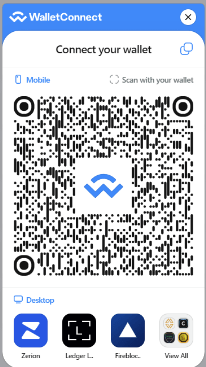
Bot: <Instructions and QR code for connecting the wallet>
The bot generates a unique QR code for the user to scan with their wallet application. This QR code is sent as a direct message (DM) to the user to ensure privacy and security.
QR Code Display
Upon receiving the /wallet command, the bot responds with a QR code image and connection instructions. The user is expected to scan this QR code with their wallet app to establish a connection.
Bot: Please scan this QR code with your wallet app to connect.
Wallet Connection Completion
Once the user successfully scans the QR code and completes the connection process in their wallet app, the bot detects this event and updates the user’s session status to “connected.”
The bot then automatically removes the QR code from the DM to maintain security and informs the user of the successful connection.
Bot: Wallet connected successfully! The QR code has been removed for security purposes.
Disconnecting the Wallet
Users can disconnect their wallets by using the /disconnect command. This ensures that the session is securely terminated, and the wallet is no longer linked to the Telegram bot.
User: /disconnect
Bot: You are now disconnected. Your wallet session has been securely terminated.
Kadena Token Price Lookups
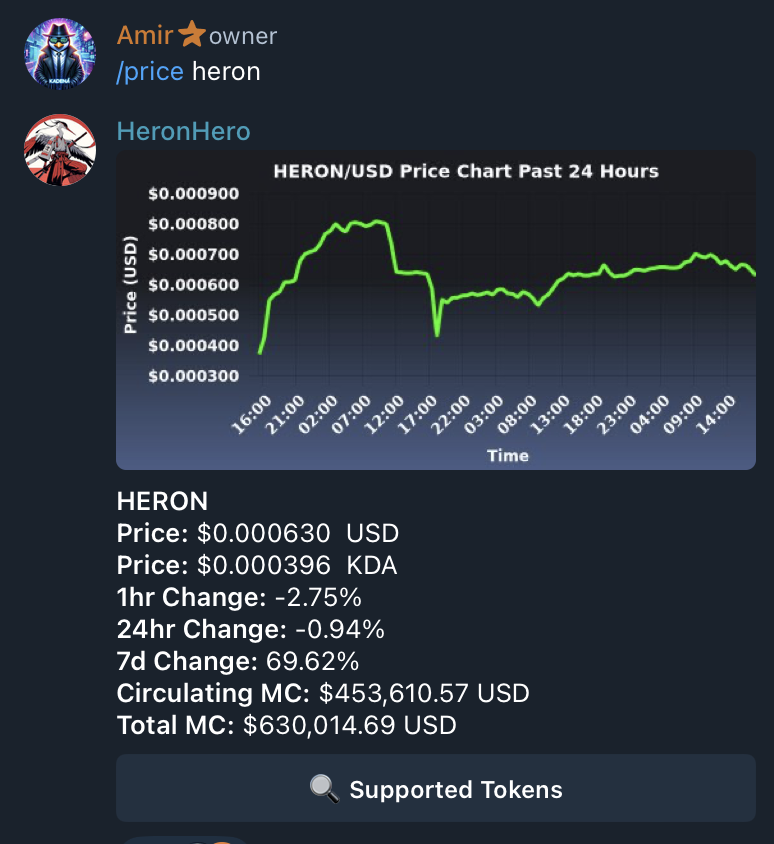
Provides real time price charts and market cap(if supplied) for Kadena fungible Tokens.
User: /price heron
Bot: Please type in a Valid price Symbol
Minting NFTs
Guide users through the NFT minting process upon receiving an image.
User: <Sends an image>
Bot: Please send the name for your NFT.
Tipping
Allows users to tip the bot.
User: /tip <amount>
Bot: Tip processed TX-ID: <transaction_id>
Additional Functionalities
Describes other features such as participating in games, viewing projects, and interacting with DAOs.
User: /games
Bot: <Lists available games>

User: /projects
Bot: <Describes available projects and integration process>